Description
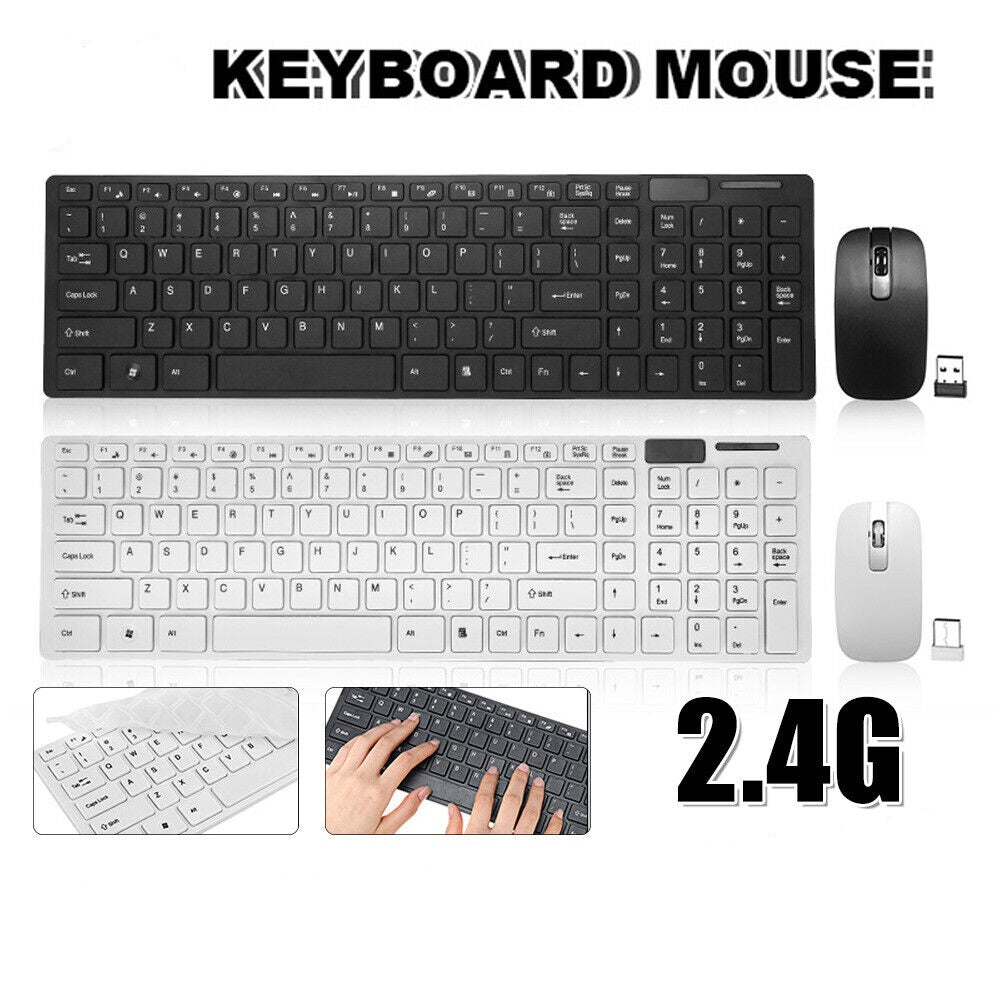
This wireless keyboard and mouse combo pairs a slim 101 key keyboard with a 1000dpi three-button mouse, both running on one 2.4GHz USB receiver with a stated range of up to 10 metres, for $49.99 in black or white at Lets Party. The keyboard measures 388 x 113 x 12mm, the mouse measures 99 x 52 x 22mm, both are ABS, and a bonus rubber keyboard film is included in the box.
Most desk setups end up cabled by accident rather than by choice. The keyboard cable is a little too short, so the tower sits where the cable reaches instead of where you want it; the mouse cable catches under the monitor stand every time you pull the chair in. A 2.4GHz set removes both problems for the cost of a AAA battery every few months. It also travels well - one small receiver in a USB port and the whole input setup moves between a desktop at home and a laptop on the kitchen table without rewiring anything.
Specifications
| Connection |
2.4GHz wireless via USB receiver |
| Operating frequency |
2450 - 2476MHz, 32 channels |
| Stated range |
Up to 10 metres |
| Keyboard |
101 keys, 388 x 113 x 12mm |
| Mouse |
3 buttons, 1000dpi, 99 x 52 x 22mm |
| Material |
ABS |
| Colours |
Black or White |
| Power |
3 x AAA batteries total, not included |
| Stated operating system |
Windows |
What's in the Box
| Keyboard |
1 x slim 101 key wireless keyboard |
| Mouse |
1 x 1000dpi wireless mouse |
| Receiver |
1 x 2.4GHz USB dongle |
| Bonus |
1 x rubber keyboard film |
| Not included |
3 x AAA batteries, mouse pad |
Why Choose This Wireless Keyboard and Mouse Combo
-
One receiver for both - the keyboard and mouse share a single USB dongle, so a laptop with only two ports keeps one free.
-
Slim 12mm profile - the keyboard is thin enough to slide under a monitor or into a laptop bag when the desk needs clearing.
-
Full 101 key layout - includes the number pad, so data entry, spreadsheets and accounting work do not lose the keys that matter.
-
Keyboard film included - the bonus rubber cover keeps crumbs, dust and the occasional coffee splash out from between the keys.
-
Two finishes - black or white at the same $49.99, so the set can match an existing desk rather than fight it.
What Is the Difference Between a 2.4GHz Wireless Set and Bluetooth?
A 2.4GHz set like this one talks to a small USB receiver that you plug into the computer, and the pair is matched at the factory so there is nothing to configure - the computer sees an ordinary keyboard and mouse. Bluetooth talks to the computer's own radio and has to be paired in software first. The practical trade-offs run both ways. The receiver approach works during startup and in a computer's BIOS or boot menu, where Bluetooth devices are often not yet available, and it works on machines with no Bluetooth at all. The cost is that it occupies a USB port and, if the receiver is lost, it cannot be replaced with a generic one. If you move between many devices, Bluetooth suits you better; if you want one desk to just work, a receiver is simpler.
Do You Need Batteries for a Wireless Keyboard and Mouse?
Yes. This set is battery powered rather than rechargeable, and the supplier specifies three AAA batteries in total across the keyboard and the mouse. They are not supplied in the box, so order a pack alongside it if you do not have spares. There is no charging cable and no internal battery to degrade, which is the upside of the arrangement - a set like this does not become e-waste the day a sealed battery stops holding charge, it just takes fresh AAAs. If you use it daily, rechargeable NiMH AAAs are worth the small extra outlay.
Will One USB Receiver Run Both the Keyboard and the Mouse?
Yes - one dongle covers both devices, which is the main practical advantage of buying a combo rather than a separate wireless keyboard and a separate wireless mouse. It matters most on modern laptops, where two or three USB ports is common and every port a peripheral takes is one you cannot use for a drive or a hub. The receiver is small enough to leave permanently in a rear port on a desktop tower. Keep it in mind when packing the set to travel - the dongle is the single component that the whole set depends on, and it is easily lost. Many designs stow it inside the mouse battery compartment, so check there first if it appears to be missing from the box.
Buyers are typically people setting up a second workstation at home, parents putting together a study desk for a high school or university student, small offices replacing worn cabled sets, and anyone using a laptop docked to an external monitor who wants the keyboard and mouse off the laptop itself. It is also a common pick for a lounge-room media PC, where the 10 metre stated range means you can type from the couch rather than at the screen.
For the rest of the desk, see our Tech and Mobile Accessories range, browse Office and Stationery for the paper side of the workspace, and check Essentials for the everyday items worth having a spare of.
Frequently Asked Questions
Will it work with a Mac?
The supplier specifies Windows only, and we have not tested it on macOS, ChromeOS, Android or a smart TV. If you need it for one of those, message us before ordering and we will put the question to the supplier rather than guess.
Is it rechargeable?
No. It runs on three AAA batteries in total, which are not included, and there is no charging port or cable.
Can the mouse DPI be changed?
The supplier states 1000dpi and does not list a DPI switch, so treat it as a fixed sensitivity. 1000dpi suits general desktop and office use rather than gaming.
Does the keyboard have a number pad?
Yes. The 101 key layout is a full-size layout including the number pad and function row.
Is the keyboard backlit?
No. The supplier lists no backlighting, and adding one would shorten battery life considerably on a AAA-powered keyboard.
What is the rubber film for?
It is a flexible cover that sits over the keys to keep dust, crumbs and spills out. You can type through it, or peel it off and keep it for storage.
Is the mouse suitable for left-handed use?
The supplier does not describe the shape as ambidextrous or as right-hand contoured, so we cannot confirm it either way. Ask us before ordering if this is important to you.
Fast Australian Shipping
We ship from within Australia, so orders reach Sydney, Melbourne, Brisbane, Perth, Adelaide, Hobart, Canberra and Darwin quickly without the long waits that come with ordering electronics from overseas sellers. Regional and remote addresses go through the standard Australia Post network.
Specifications including range, frequency, dimensions and key count are supplied by the manufacturer. Wireless range depends on your environment - walls, metal furniture and other 2.4GHz devices such as Wi-Fi routers and cordless phones all reduce it. Batteries are not included. Colour may appear different on screen.