


No products in the cart.


Free Shipping Australia-Wide

5 star customer service

Quality Tested Products

Picking the right projector can turn any blank wall into an incredible big-screen experience, but let's be honest—the specs and jargon can feel overwhelming. This guide is here to cut through the noise. We'll help you find the perfect model for what you actually want to do, whether that's hosting epic movie nights, diving into immersive gaming, or delivering sharp, professional presentations.
My goal is to decode the numbers and terms that really matter so you can feel good about your choice.
Jumping into the world of projectors is more exciting and affordable than ever before. Forget the old days when these devices were bulky machines chained to a boardroom or a custom-built home theater. Today’s projectors are powerful, versatile, and built for just about any space you can imagine, from your living room to a backyard movie night under the stars.
The market is exploding for a reason. Valued at USD 10.92 billion in 2024, the global projector market is expected to surge to USD 18.27 billion by 2032. This isn't just about corporate or classroom use; a huge part of that growth is from people like you wanting a better home entertainment setup. It’s a great time to be in the market for one.
I built this guide to be your jargon-free manual. Instead of just listing dry specs, we're going to translate them into what they mean for you in the real world. You shouldn't need an engineering degree to buy a projector, and my aim is to give you the confidence to make a great decision. To get the full picture, it also helps to understand the other essential audio visual equipment for events that complements a great projector.
Here’s a quick look at what we’ll cover:
By the time you're done reading, you'll know exactly what to look for.
Before you get bogged down in specs like lumens and contrast ratios, the first and most important step is figuring out what kind of projector you actually need. Think of it like buying a car. A sports car and a moving truck both get you from point A to B, but you wouldn't try to haul a sofa in a Porsche.
Projectors are the same—they're tools built for specific jobs. We can break the entire market down into four main families. Once you know which family you belong to, you can filter out all the noise and focus on the models that will actually make you happy.
This is where the movie buffs and dedicated binge-watchers live. Home theater projectors are engineered with a single-minded purpose: to create a stunning, cinematic picture in a controlled, dark room like a basement or dedicated media room.
They're all about nailing the things that make movies and shows look incredible:
If you're building a special place for watching movies, streaming your favorite series, or playing immersive games where picture quality is king, this is your category.
Ever wanted to host a movie night in the backyard at a moment's notice? Or maybe carry a 100-inch screen in your backpack for a weekend trip? That's the magic of portable projectors. These little dynamos are all about versatility and convenience.
They might not have the raw image-quality chops of a dedicated home theater unit, but that's not their game. Their strengths lie in being lightweight, often battery-powered, and dead simple to set up. Many even come with built-in speakers and smart TV features, so you can stream Netflix or YouTube directly. They’re perfect for spontaneous movie nights, camping, or whipping out a quick presentation anywhere you happen to be.
Meet the unsung heroes of boardrooms and classrooms. The design philosophy here is a complete 180 from home theater models. Instead of chasing perfect black levels, these projectors are built for one thing above all else: brightness.
They are made to punch through the ambient light of a fluorescent-lit office or a classroom with the blinds open, ensuring that slides, charts, and text are always sharp and easy to read. You’ll also find they have a ton of connection options to easily hook up any laptop that comes through the door.
An interesting development here is the boom in interactive models. The global market for these devices hit USD 3,565.6 million in 2024 and is expected to rocket to USD 11,526.5 million by 2035. Why? Because they can turn any flat surface into a collaborative touchscreen, a feature that's changing the game in meetings and lessons. You can dive deeper into the growth of the interactive projector market to see where this is headed.
While you can certainly take a portable projector outside, a dedicated outdoor projector is a different beast. These models are built tougher and, crucially, brighter to compete with ambient light from the moon, streetlights, or a lingering sunset.
Key Takeaway: An "outdoor" projector isn't necessarily waterproof, but it is specifically optimized for open-air viewing. They pack more lumens (brightness) and often have more powerful built-in sound systems to fill a larger area than their smaller portable cousins.
If you're planning on frequent backyard movie nights or hosting outdoor events, grabbing one of these specialized units will ensure your picture looks vibrant and punchy, not washed-out and disappointing.
Still weighing your options? This table breaks down the four types at a glance to help you find the perfect match for what you want to do.
| Projector Type | Best For | Key Strengths | Ideal Environment |
|---|---|---|---|
| Home Theater | Movie lovers, gamers, and streaming enthusiasts | Exceptional contrast, color accuracy, and quiet operation | Dark, light-controlled rooms |
| Portable | On-the-go entertainment, impromptu movie nights, travel | Compact size, built-in battery and speakers, easy setup | Anywhere, indoors or out (at night) |
| Business & Education | Presentations, meetings, and classroom instruction | High brightness to overcome ambient light, connectivity | Well-lit offices and classrooms |
| Outdoor | Backyard movies, parties, and open-air events | High brightness, rugged build, powerful built-in audio | Backyards and outdoor spaces at dusk |
Seeing them side-by-side makes it clear how each category is tailored for a specific mission. Choosing the right one from the start is the key to getting a projector you'll love using.
Stepping into the world of projectors can feel a bit like learning a new language. You'll see terms like lumens, contrast, and throw ratio tossed around, and they hold all the secrets to getting a great picture. Let's translate that confusing tech jargon into practical advice you can actually use.
Think of it this way: you wouldn't buy a car without knowing what horsepower and MPG mean for your daily commute. It's the same deal here. Once you get a handle on a few key specs, you can confidently pick a projector that will give you that stunning, big-screen experience you're after.
The first spec you'll almost always see is brightness, measured in lumens. It’s pretty straightforward—the more lumens, the brighter the picture.
Imagine you’re trying to read in a sunlit room. You need a bright light to see the page clearly. A projector works the same way. The more ambient light you have from windows or lamps, the more lumens you need to "punch through" that light and keep the image from looking faded and washed out.
A projector's brightness needs to match its environment:
Next up is resolution, which is just a fancy way of saying how many tiny dots (pixels) make up the picture. The more pixels you have, the sharper and more detailed the image will be. It's like the difference between an old, blurry photograph and a modern, high-quality print.
You’ll mainly run into two common resolutions:
Contrast ratio measures the difference between the absolute whitest white and the darkest black a projector can create. To get why this matters, think of a starry night sky. The most stunning views are when those bright stars pop against a deep, inky black canvas. That's high contrast in action.
A projector with a high contrast ratio can produce those deep, true blacks, which gives the image a real sense of depth and realism. If the contrast is low, blacks will look more like muddy gray, and the whole picture will feel flat and uninspired. For movie lovers, this spec is everything, especially for those dark, moody scenes.
Digging into general display technology considerations can give you a better grasp of how things like backlights affect contrast and color, which is just as relevant for projectors as it is for PC monitors.
Throw ratio sounds complicated, but it's not. It simply tells you how far back the projector needs to be to create a specific screen size.
Think about making a shadow puppet on a wall. The closer your hand is to the light, the bigger the shadow gets. The throw ratio is a fixed version of that relationship, and it's absolutely critical for making sure a projector will actually fit in your room.
Finally, let's talk about what's powering the whole show: the light source. Just like light bulbs, there are different types, and each comes with its own pros and cons in terms of lifespan and performance. The big three are Lamp, LED, and Laser.
Choosing the right one is really a balance between the upfront cost and long-term value. A traditional lamp-based projector might be cheaper to buy, but you'll be replacing that bulb every few years. Laser and LED models are the modern approach, built for longevity and efficiency.
You can see this shift happening in the market. Laser projectors dominate for longevity, with incredible 20,000-30,000 hour lifespans compared to a lamp's 3,000 hours. For a home cinema fan, that can reduce replacement costs by as much as 70% over five years. At the same time, LED models are the efficiency champs, using 40-50% less power, which is a great perk for eco-conscious families. While LCD projectors held a market value of $6.68 billion in 2019, today's DLP technology often wins out by delivering superior contrast for those all-important dark scenes.
Alright, you've got the technical jargon down. Now for the most important part: connecting all that theory to your actual room and your real-world budget. This is where the magic happens.
Choosing the right projector isn't about chasing the highest specs on a datasheet. It's about finding the perfect match for your space. A top-of-the-line, $5,000 projector is just an expensive paperweight in the wrong room, while a carefully chosen budget model can absolutely blow you away.
Let's get practical. First, we’ll analyze your room—measuring distances and figuring out your lighting situation. Then, we’ll look at what you can realistically expect for your money so you don't overspend on features you'll never use.
Before you even glance at a price tag, you need to know your room like the back of your hand. A few simple measurements will narrow your options more effectively than anything else. Ignoring your space is the single biggest mistake new buyers make.
Grab a tape measure and get ready to ask a few key questions:
This flowchart puts it all together, showing how your room and viewing habits point you toward the right specs.
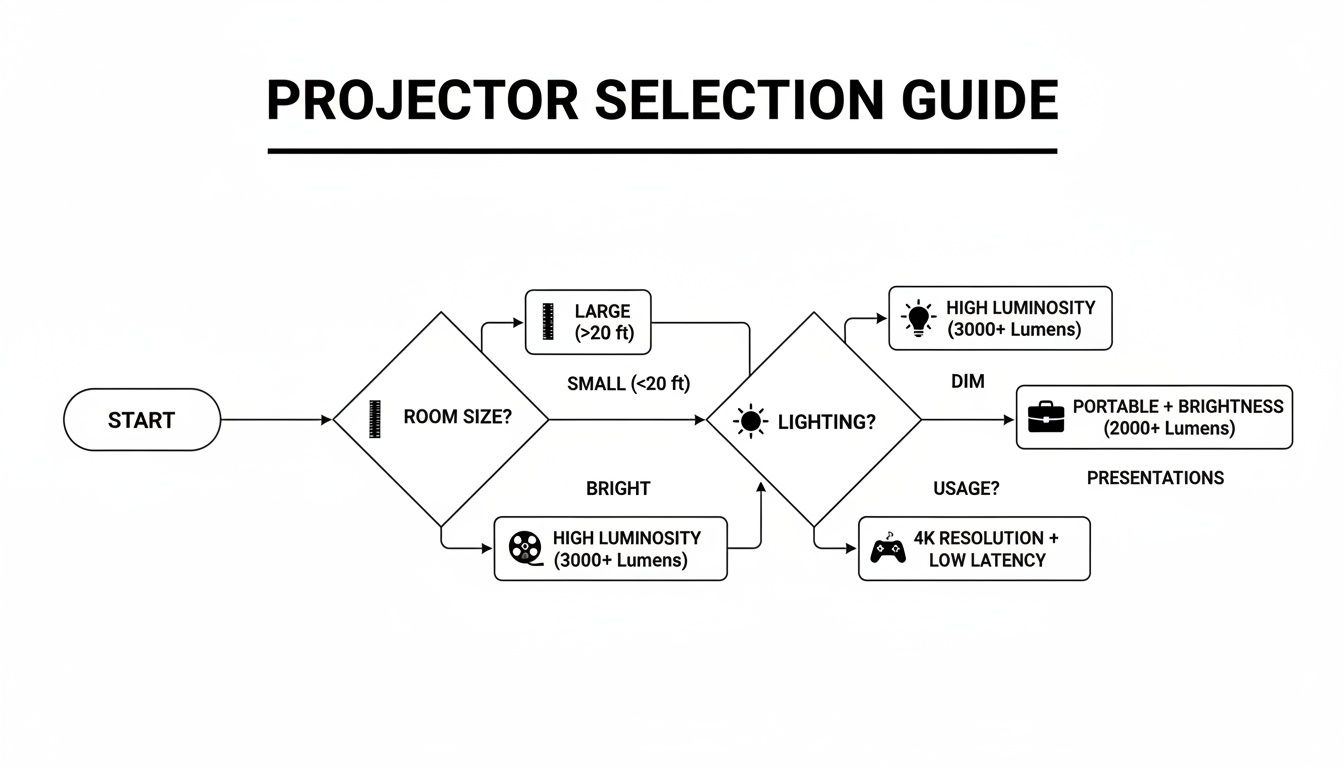
The takeaway here is simple: there is no single "best" projector. There's only the best one for you, based on your specific room and how you plan to use it.
Now that you have your room’s vital statistics, you can set a realistic budget. Projector prices swing wildly from a few hundred dollars to the price of a used car. The good news is that they generally fall into a few predictable tiers. Knowing what to expect in each bracket is key to getting the most bang for your buck.
Expert Tip: Think about the long game, not just the sticker price. A cheaper lamp-based projector might seem like a deal, but after you buy a couple of $150 replacement bulbs, that "more expensive" laser or LED model suddenly looks a lot more attractive.
Let's see what your money gets you.
I've put together a quick table to show what features and performance you can generally expect at different price points.
| Budget Tier | Typical Price Range | Expected Resolution | Common Light Source | Best Use Case |
|---|---|---|---|---|
| Entry-Level | Under $500 | 1080p (Full HD) | LED or Lamp | Casual movie nights, portable use, kids' rooms. |
| Mid-Range | $500 - $1,500 | High-Quality 1080p or Entry 4K | Laser or LED | Dedicated home theaters or bright living rooms. |
| Premium | $1,500+ | True 4K | Laser | Cinephiles, high-end media rooms, UST setups. |
This table is a great starting point for matching your wallet to your wishlist. Let's dig a little deeper into each of these categories.
This is your ticket into the world of big-screen fun without a huge investment. In this price range, you'll find some fantastic portable projectors and solid 1080p models that are perfect for movie nights or gaming.
For most people building a real home theater, this is the sweet spot. The jump in picture quality, brightness, and overall performance from the budget tier is significant, offering incredible value.
Welcome to the deep end of the pool. This tier is for those who refuse to compromise on quality. Here you'll find true 4K resolution, powerful laser engines, and clever designs like ultra-short-throw projectors that sit just inches from your wall.
So, you've brought your new projector home. The fun is just getting started. To get that jaw-dropping, cinema-quality picture you're after, you'll need to spend a little time on setup and give it some occasional care. It's a bit like tuning a new guitar—a few quick adjustments are all it takes to go from "good" to "unbelievable."
This is where the magic happens. We’ll walk through how to position your projector, hook everything up, and use some clever built-in tools to dial in the perfect picture. Nailing these steps not only gives you a stunning image right out of the box but also helps your projector last for years.
First things first: find the sweet spot. Your throw ratio is your guide here, but the basic idea is to place the projector where it can throw a centered, square image that fills your screen or wall. Once you've got it roughly in place, it's time to fine-tune.
The process is pretty simple:
Let's be real—perfect physical placement isn't always possible. Maybe your projector has to sit on a low coffee table, pointing up at an angle. This creates a distorted, trapezoid-shaped image instead of a nice rectangle. Don't worry, this is where digital correction tools save the day.
Keystone Correction: This is a digital feature that reshapes the image to fix that trapezoid effect. It's a lifesaver for quick setups, but be aware that it can slightly soften the picture quality. I recommend using it only when you have to; getting the projector as physically level as possible is always the best starting point.
Lens Shift, on the other hand, is a more premium feature found on higher-end models. It's a physical adjustment that lets you move the actual lens—up, down, left, or right—without moving the projector body. This allows you to line up the image perfectly on the screen with zero digital trickery, preserving 100% of the picture quality.
A little maintenance goes a long way in keeping your projector running at its best. The two most important things you can do are keeping the lens clean and making sure it can breathe.
A dusty lens makes for a fuzzy, dull picture. Just use a microfiber cloth and a bit of gentle lens cleaner, wiping in a circular motion. Never use paper towels or harsh chemicals; they can easily scratch the delicate lens coating.
Good airflow is also non-negotiable. Projectors generate heat, and overheating is the fastest way to shorten the lifespan of your lamp or laser.
Finally, remember that a great picture is only half the experience. The tiny built-in speakers on most projectors just don't cut it. For sound that truly matches the massive image, have a look at our guide on finding the best budget soundbar for TV.
Alright, you've done the hard work. You've waded through the specs, measured your space, and figured out a budget. Before you click that "buy" button, let's run through one last sanity check.
Think of this as your pre-flight inspection before launching into an amazing big-screen experience. A few final questions can mean the difference between a good purchase and a great one.
Ask yourself these five questions. If you can confidently answer "yes" to each, you're golden.
Did I actually measure the throw distance? Seriously, get out the tape measure one more time. Does the distance from your projector's future home to the screen match up with its throw ratio? You need to be sure it can create the screen size you're dreaming of from that exact spot.
Are the lumens right for my real-world room? Be honest with yourself about ambient light. If you mostly watch with the lights on or during the day, will the brightness you chose cut through it? Or are you going to be stuck with a washed-out image?
Does it have the connections I need right now (and for the future)? Check the back panel in the product photos. Make sure it has enough HDMI ports for your Blu-ray player, gaming console, and streaming stick. And maybe think ahead—is a USB-C port something you'll wish you had in a year or two for a new laptop?
Have I thought about the long-term running costs? That cheaper lamp-based projector looks tempting, but have you factored in the price of replacement bulbs down the road? Sometimes, paying a bit more upfront for a laser or LED model saves you money and hassle in the long run.
Is the resolution truly going to satisfy me? You know what you want to watch. If it's stunning 4K movies, don't settle for less. If it's fast-paced gaming, make sure that 1080p resolution is sharp enough for you. Does the spec sheet match your expectations?
If you’ve got solid answers for all of these, you're ready to go. You've done your homework and can feel great about your decision. As a final tip, timing your purchase can snag you a better deal; knowing the best time to buy electronics can often save you a nice chunk of change.
Alright, you've waded through the specs and have a few contenders in mind. But a couple of nagging questions often pop up right at the finish line. Let's tackle the most common ones I hear, so you can make that final choice with complete confidence.
This is easily the most-asked question, and the honest answer is… maybe not at first. A smooth, white wall is perfectly fine for getting started, especially for a casual setup or a fun backyard movie night. It's the zero-cost way to get an image up and running.
However, if you're serious about picture quality, a dedicated screen is a game-changer. Think of it this way: a painted wall just bounces light back randomly. A real screen is engineered with special optical coatings to reflect light directly back at you, the viewer. This means a brighter picture, richer colors, and much deeper black levels.
The Analogy: Projecting onto a wall is like listening to music through your phone’s built-in speaker. It works, you can hear the song, but you're missing all the detail. A proper screen is like plugging in a great pair of headphones—suddenly you hear everything the way it was meant to be heard.
If you’ve invested in a decent projector, pairing it with a screen ensures you’re actually seeing the performance you paid for.
There's no single magic number here. The right brightness is all about the room you're in. Overspending on lumens for a dark room is a waste of money, and underspending for a bright room will leave you with a washed-out, disappointing image.
Here’s a simple cheat sheet:
Matching brightness to your space is one of the most important decisions you'll make.
Marketing departments love to create confusion with this one, but it’s actually very simple.
Native resolution is what truly matters. It's the physical number of pixels on the projector's imaging chip. If a projector has a native 1920x1080 (1080p) resolution, it means it has exactly that many pixels to build the image. This is the true measure of its sharpness and detail.
Supported resolution just means what kind of signal the projector can understand. A projector might "support" a 4K signal, but if its native resolution is only 1080p, it has to shrink that 4K source down to fit its 1080p pixel grid. You're not actually seeing a 4K image, just a downscaled version of it.
Always, always look for the native resolution. That number tells you the real story of the projector's performance.
At FindTopTrends, we curate the best tech and home essentials to make your buying decisions easier. Explore our collections to find the perfect gear for your lifestyle by visiting us at https://findtoptrends.com.




