


No products in the cart.


Free Shipping Australia-Wide

5 star customer service

Quality Tested Products

When it comes to picking the best budget soundbar for a TV, there are a few non-negotiables. You'll almost always want one with HDMI ARC for a super simple setup, a dedicated center channel so you can actually hear what people are saying, and a 2.1 system (that means a soundbar plus a subwoofer) for sound that has some real punch. Focusing on these essentials is the key to getting a massive audio upgrade without breaking the bank.
Ever find yourself jacking up the volume during a quiet movie scene, only to get your ears blasted off when the action kicks in? That's the curse of modern TV speakers. Today's TVs are unbelievably thin and look amazing on the wall, but that sleek design comes at a cost—there's simply no room for decent speakers. What you're left with is sound that’s often tinny, weak, and muddy. It just doesn't do justice to the stunning picture on the screen.
Here’s an analogy: relying on your TV's built-in audio is like listening to your favorite band through cheap, crackly earbuds. You get the gist of the song, but you miss all the depth, the texture, and the power. Switching to even a basic soundbar is like putting on a great pair of over-ear headphones. Suddenly, every whisper is crystal clear, every explosion feels like it's shaking the room, and the whole experience pulls you in.
This frustration is exactly why so many people are adding soundbars to their living rooms. They've become the go-to fix for anyone who wants a simple, powerful audio boost. The market numbers tell the same story: the global soundbar market was valued at USD 7.50 billion in 2023 and is expected to jump to USD 13.40 billion by 2030. A huge driver of that growth? Simple 2-channel models, which deliver sound up to three times clearer than standard TV speakers, make up over 50% of the budget market.
So, what exactly changes the moment you plug in a decent budget soundbar? The upgrade isn't subtle; it's an immediate, night-and-day difference for everything from movies to the nightly news. While you're enhancing your family's viewing experience, it's also a good time to think about content management; for more on that, you can learn about setting up parental controls on your TV.
This table breaks down the instant improvements you'll hear.
| Audio Aspect | Typical Built-In TV Speakers | Entry-Level Budget Soundbar |
|---|---|---|
| Dialogue Clarity | Often muffled and hard to hear against background noise. | Crisp and clear, thanks to dedicated audio channels. |
| Bass & Impact | Weak or non-existent, making action scenes feel flat. | Deeper, richer bass that adds weight to sound effects. |
| Soundstage | Narrow and confined, with sound coming from one spot. | Wider and more expansive, creating an immersive feel. |
| Distortion at High Volume | Tends to crackle or buzz when turned up loud. | Maintains clarity and control at higher volumes. |
The bottom line is that a budget soundbar isn't just about making things louder. It's about bringing clarity, depth, and excitement back to your TV's sound.
Shopping for a budget soundbar can feel like cramming for an exam you didn't know you had. The box is covered in terms like "2.1 channels," "frequency response," and "Dolby Digital." It’s easy to get lost in the jargon, but here’s the secret: only a handful of those specs really change how your movies and shows actually sound.
Let's break down what you actually need to know to make a smart choice.
Think of audio channels like individual speakers, each with a specific job. In a basic 2.0 channel soundbar, you get two: a left and a right. This simple stereo setup is already a huge leap from your TV's built-in speakers, giving sound a sense of direction and making everything from music to sound effects feel wider and more engaging.
Now, if you see a 2.1 channel system, pay close attention to that ".1". It means you’re getting a separate subwoofer, the specialist responsible for all the deep, rumbling bass. This is the speaker that handles the explosions, the deep thrum of a movie score, and the thump of a bassline. By taking on the heavy lifting of low-end frequencies, it frees up the main soundbar to focus on dialogue and mid-range sounds, leading to much better overall clarity.
Once you move into slightly better budget models, you'll start seeing 3.1 channel soundbars. That "3" introduces a dedicated center channel, and frankly, it's the single most important feature for anyone frustrated with muffled dialogue.
Picture it this way: the left and right speakers handle the ambient noise, music, and off-screen action. But that third speaker in the middle has one job and one job only: delivering voices. This separation is a total game-changer. Dialogue is no longer fighting to be heard over a car chase or a swelling orchestra. It’s locked right to the center of your screen, so every word comes through crisp and clear. If you find yourself constantly reaching for the subtitles, a 3.1 system is your solution.
This visual shows how these key upgrades directly fix the most common TV audio problems.
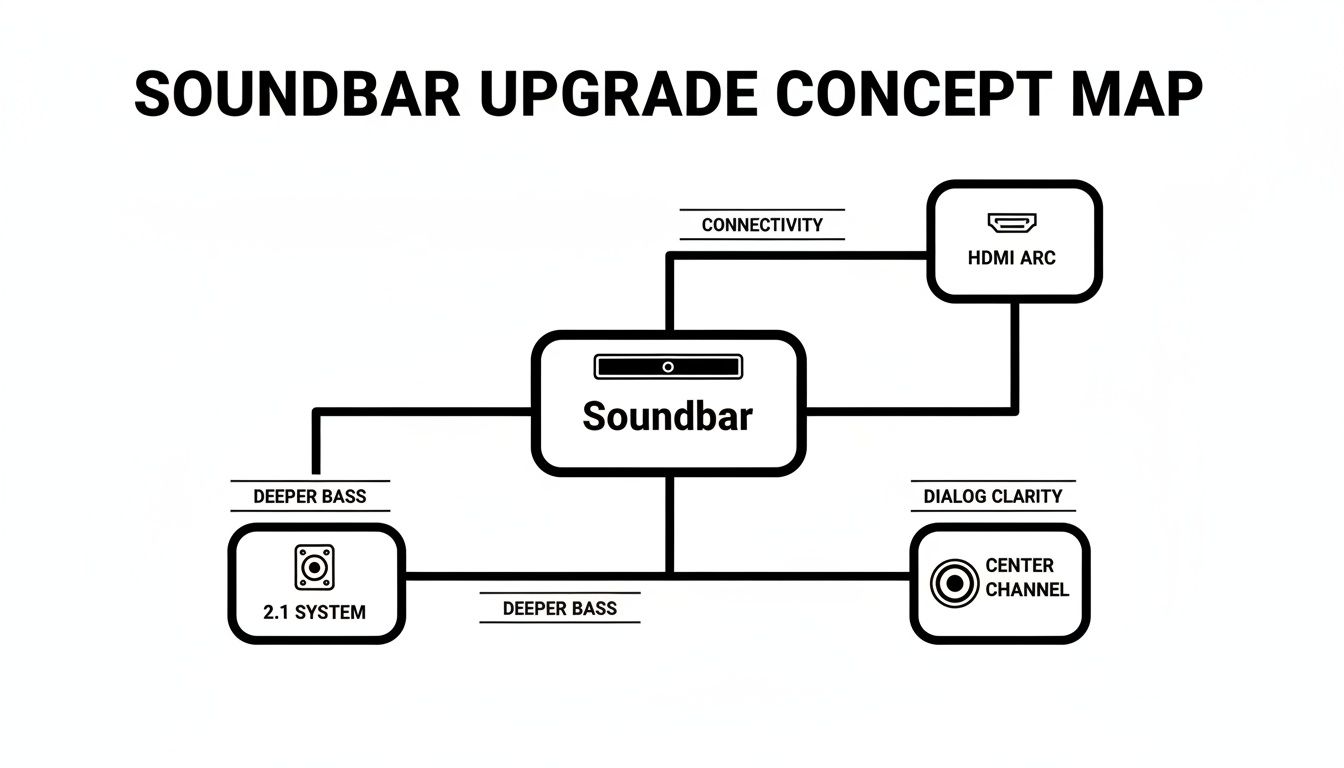
As you can see, a soundbar's real value isn't in a long list of features. It’s about solving problems—simplifying connections with HDMI ARC, delivering impactful bass with a 2.1 setup, and making dialogue understandable with a dedicated center channel.
Next up are audio codecs, which are just the different "languages" that sound is recorded in. You don’t need a degree in audio engineering here, but knowing a few names will help you sort things out.
The bottom line is this: for most people, solid support for Dolby Digital is what matters most. It guarantees your soundbar will work with virtually everything you throw at it, from Netflix to the evening news.
Don’t get mesmerized by a soundbar that boasts support for a dozen different codecs. A well-built system that nails the basics like Dolby Digital will always sound better than a cheap one with poor-quality speakers that just happens to have a long list of logos on the box.
Finally, you’ll see specs like frequency response (the range of tones a speaker can play). While it sounds scientific, manufacturers often measure it differently, making it a nearly useless comparison tool for budget gear. Stick to the tangible features: the number of channels, a dedicated subwoofer, and support for the core audio formats. Those are the things that will actually transform your TV's flat, lifeless audio into something rich and exciting.
Alright, you've picked out the perfect soundbar. Now for the final, crucial step: getting it hooked up correctly to unlock its true potential. A great soundbar with a poor connection is like a sports car stuck in traffic—all that power is there, but you can't actually use it.
Think of the different connection types as audio pipes. Some are massive superhighways that carry tons of information without breaking a sweat, while others are more like quiet country roads. Choosing the right one makes a world of difference in sound quality and, just as importantly, everyday convenience.
There's a reason the global soundbar market is booming. As TVs have gotten impossibly thin, their built-in speakers have paid the price, with most being rated less than 50% effective at creating an immersive experience. The market hit USD 9.57 billion in 2025 and is set to more than double to USD 21.62 billion by 2034. This explosion in popularity means even budget-friendly soundbars now pack a serious audio punch.
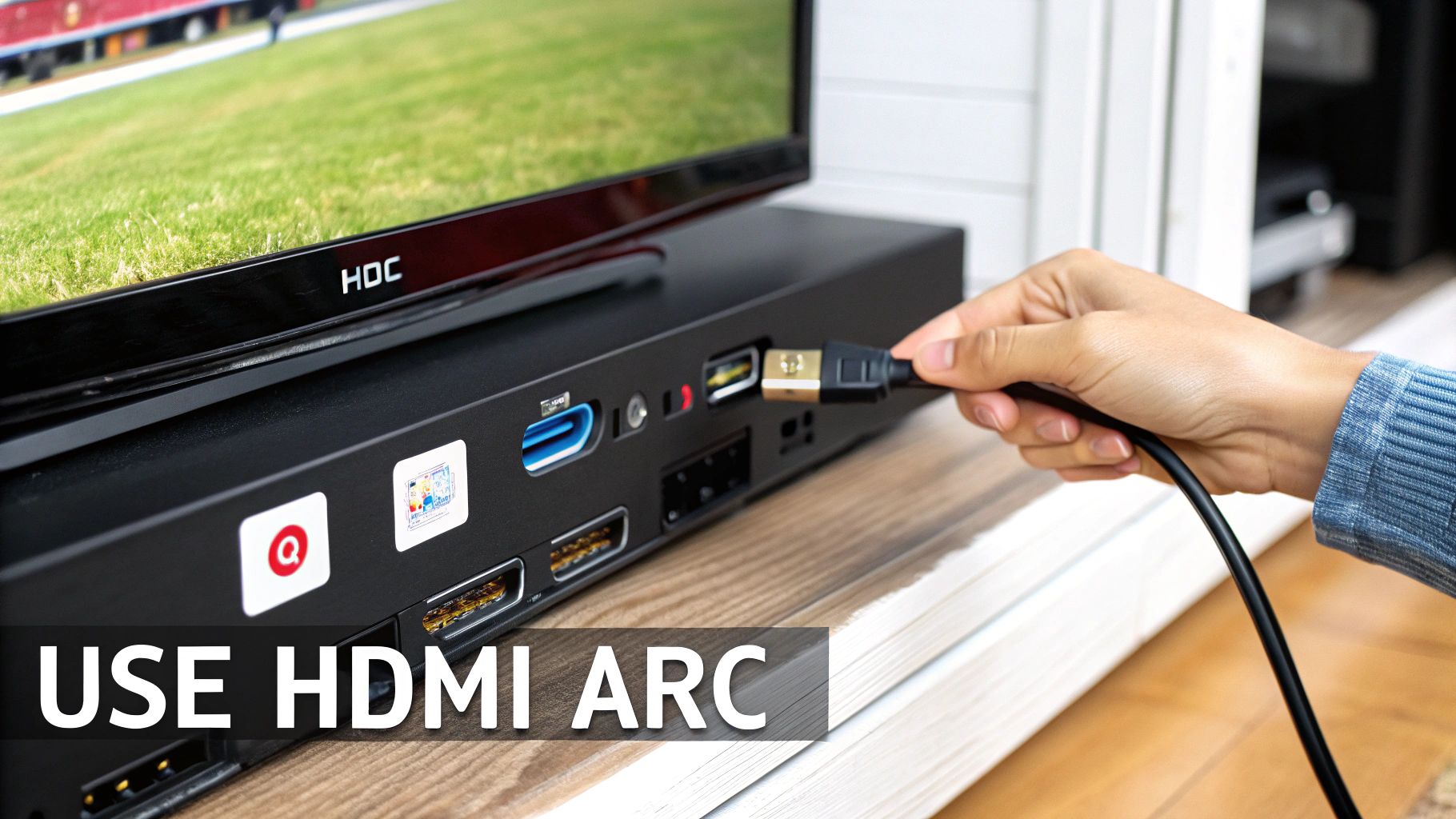
For just about any modern TV and soundbar, HDMI ARC (Audio Return Channel) is the hands-down best choice. It's that audio superhighway I was talking about. A single HDMI cable plugs into the ARC port on your TV and the corresponding port on your soundbar, creating a two-way street for sound and commands.
This connection gives you two huge wins:
Keep an eye out for HDMI eARC (Enhanced Audio Return Channel), which is the newer, beefier version. It can handle the highest-quality, uncompressed audio formats out there. While it's still finding its way into all budget models, it's a fantastic feature for future-proofing your setup.
Pro Tip: Always use the port labeled "HDMI ARC" or "eARC" on your TV. A standard HDMI port won't do the trick, as it can only receive signals, not send audio out to the soundbar.
What if your TV is a bit older and doesn't have an HDMI ARC port? No problem. Your next best bet is the Optical connection, sometimes called Toslink. This port uses a fiber-optic cable to send a pure digital audio signal from your TV to the soundbar.
An optical connection is a rock-solid, reliable choice that still supports standard surround sound like Dolby Digital. The only real downside is that it's a one-way street just for sound—it can't carry remote control signals. That means you'll need to use the soundbar's remote for volume.
Finally, we have Bluetooth. This is by far the easiest and most convenient option, giving you a completely wireless setup. It’s perfect for streaming a playlist from your phone or tablet directly to the soundbar. In fact, many soundbars that connect to your TV via cable also have Bluetooth, giving you the best of both worlds. For those thinking bigger, integrating a soundbar into a multi-room speaker system is a great next step.
But for movie night, Bluetooth is the weakest link. The audio has to be compressed, which can thin out the sound. More importantly, you can sometimes get a tiny delay (latency), causing the audio to fall out of sync with the video on screen. When setting up your home, it's helpful to see how different gadgets can work together; you can learn more about this in our guide on the https://letsparty-au.myshopify.com/blogs/news/best-smart-home-devices.

It’s easy to get lost in specs and features, but one of the biggest mistakes people make when buying a soundbar is forgetting about the room itself. You need to think about the relationship between your soundbar, your TV, and your space. A tiny soundbar in a huge, open-plan living room will sound thin and get completely lost. On the flip side, a beast of a soundbar in a small bedroom is just expensive overkill.
Think of it like trying to light a big room with a tiny desk lamp—it just won't work. A soundbar needs enough oomph to fill your space with clear, rich audio without sounding like it's straining. Nailing this balance is probably the most important step to getting a setup you'll actually love.
A good rule of thumb for aesthetics is to match the soundbar's width to your TV's. For a clean, put-together look, the soundbar should be slightly narrower than or the exact same width as your television. When a soundbar is much wider than the TV, it just looks awkward and throws off the whole visual balance of your entertainment center.
When you’re browsing soundbars, you’ll see power output listed in watts. This isn't just a number to brag about; it tells you how loud the soundbar can get without the sound turning into a distorted mess. If you have to crank a low-power soundbar to the max just to hear it, the audio will sound terrible.
Here’s a quick guide to matching watts to your room size:
People often think more watts automatically equals better sound quality. That’s not quite right. The goal is having enough headroom so the amplifier never struggles. A 100-watt soundbar playing at half volume will sound much cleaner and more dynamic than a 50-watt soundbar pushed to 90%.
Where you physically put your soundbar matters almost as much as which one you buy. Bad placement can muffle the sound, create weird echoes, or even block your TV's remote sensor. You’ve really got two main options.
1. Placing on a TV Stand or Console
This is the easiest and most common setup. Just place the soundbar right in front of your TV, making sure it’s centered. The trick is to pull it to the very front edge of the stand. This stops the sound from bouncing off the top of the console, which can make the audio sound muddy. Also, double-check that it’s not so tall that it blocks the little IR sensor on your TV.
2. Mounting on the Wall
For a super clean, minimalist look, mounting the soundbar on the wall right below your TV is a fantastic choice. It also does a great job of making the sound feel like it's coming directly from the screen. One thing to know is that walls can sometimes amplify bass a little too much. Many soundbars have an EQ setting to fix this—look for a "wall mount" mode in the audio settings to get things balanced.
At the end of the day, finding the best budget soundbar for your TV is about finding a model that’s the right fit for your home, both physically and sonically. Match the size to your TV and the power to your room, and you’ll have a setup that sounds as good as it looks.
When you're on the hunt for a budget soundbar, it's good to remember that "budget" isn't a one-size-fits-all term. What you get for $100 is a world away from what $250 can buy, and understanding those differences is the secret to getting a great deal. It’s not about finding one perfect soundbar; it’s about finding the right features for what you're willing to spend.
Think of it like buying a car. The base model will get you from A to B just fine, but every step up in price adds something extra—a better stereo, heated seats, maybe some new tech. Soundbars work the same way. Each price jump brings a noticeable upgrade in performance or convenience.
Let’s break down what you can realistically expect at each level.
This tier is all about solving one major problem: the thin, tinny audio coming from your TV's built-in speakers. Soundbars under $100 are the most straightforward upgrade you can make. They're typically compact, 2.0 channel units that deliver clean stereo sound, which is an immediate and massive improvement.
Here’s what you'll almost always get:
What you're not getting here is that deep, cinematic rumble or an expansive soundstage. Think of these models as dialogue workhorses—they make voices clear and understandable without any fuss.
For most people, this is where the magic happens. This is the sweet spot where your money delivers the biggest and most noticeable jump in audio quality. You go from "better than the TV" to "wow, this actually sounds good."
The big deal in this price range is the introduction of the "2.1" channel system. This means the soundbar comes with a separate subwoofer, often wireless. It's a total game-changer for movies and music, letting the sub handle the heavy lifting for all the low-end bass and explosions.
Here are the key upgrades you'll find:
Once you push past the $200 mark, you’re in the high-end of the budget world. These soundbars start to blur the line between affordable and mid-range, packing in features that, just a few years ago, you’d only find on much more expensive systems. The goal here is to create a much more immersive, room-filling sound.
You can expect everything from the sweet spot, plus a few of these more premium features:
Knowing how these tiers work helps you match your budget to your expectations. That way, you can be sure you're getting the most bang for your buck.
It's easy to get caught up in the excitement of upgrading your TV's sound, but a few common missteps can quickly lead to disappointment. Knowing what not to do is just as critical as knowing what features to look for. Let's walk through the most frequent blunders so you can sidestep them and get the most out of your new gear.
The single biggest mistake I see people make is grabbing a soundbar without HDMI ARC. They see an Optical port, figure it's good enough, and then spend the rest of their days juggling two different remotes. Trust me, you don't want that life. HDMI ARC is the magic that lets your TV remote control the soundbar's volume automatically. It's a non-negotiable for a seamless experience.
Another classic pitfall is falling for the marketing hype around big bass while ignoring the most important job of a soundbar: making voices clear. You absolutely want a model with a dedicated dialogue enhancement mode. Without it, you'll be constantly reaching for the remote, turning the volume up for quiet conversations and then scrambling to turn it down when the action kicks in.
Once you get your soundbar home, where you put it matters. A lot. So many people unbox their shiny new speaker and immediately tuck it away inside a media cabinet or on a deep shelf.
This is one of the worst things you can do. It traps the sound, muffles the audio, and completely ruins any sense of an open, wide soundstage. Your soundbar needs a clear, unobstructed path to your ears. Always place it on top of your TV stand, right at the front edge.
Finally, don't forget the final—and crucial—step: disabling your TV’s internal speakers. If you skip this, audio will play from both the soundbar and the TV simultaneously. The result is a weird, distracting echo that makes everything sound muddy and cheap. Dive into your TV’s audio settings and switch the output to your soundbar (it might be called "External Speaker," "Receiver," or "HDMI ARC").
To keep it simple, here are the main traps to avoid:
Steering clear of these few simple things will save you a world of frustration and ensure you actually get the fantastic audio upgrade you paid for.
Even after you've done your homework, a few questions always seem to come up. Let's clear up some of the most common ones so you can feel 100% confident in your choice.
Honestly, it depends on what you're after. If your only goal is to hear dialogue more clearly, then no, you don't need one. But if you want that movie theater rumble and a truly immersive experience, a subwoofer is a game-changer.
The sub handles all the deep, low-frequency sounds—the stuff you feel as much as you hear, like explosions or the bass in your favorite songs. This frees up the main soundbar to focus purely on the mids and highs, resulting in much clearer and more dynamic audio overall.
If your budget is stretched thin, look for a soundbar with a "sub-out" port. It's a fantastic feature that lets you add a subwoofer down the road when you're ready to upgrade.
Pretty much, yes. Whether you have a Samsung, Sony, LG, or any other brand, you can be confident that nearly any soundbar will work with it. Compatibility isn't about the brand name; it's all about the ports.
The connection you're really looking for is HDMI ARC on your TV. It's been standard for the better part of a decade and is the ideal way to connect for both quality and convenience. If you don't have that, an Optical port is a solid backup. Any hiccups are almost always a settings issue, not a hardware mismatch.
Think of it like this: Dolby Digital is the foundation. It’s the tried-and-true 5.1 channel surround sound format that’s been the standard for DVDs, TV broadcasts, and streaming for years. It’s a massive step up from your TV's built-in stereo speakers.
Dolby Atmos is the next level. It adds a layer of height to the sound, creating a 3D bubble of audio that can place sounds above you, not just around you. On budget soundbars, this is usually "virtual," using clever acoustic tricks to bounce sound off your ceiling. The effect is a much wider, more engaging soundstage that really pulls you into the action.
Yes, and you absolutely should! This is one of the biggest quality-of-life features, and it’s enabled by connecting your gear with an HDMI ARC or eARC cable. That connection creates a two-way street, letting your TV remote talk directly to the soundbar to control power and volume.
If you use an Optical cable, you'll probably be stuck juggling two remotes—one for the TV and one for the soundbar's volume. For a seamless, one-remote experience, always use HDMI ARC if you can. And if you're looking for that same wireless convenience for your personal audio, check out our guide on the best wireless headphones under $200.
Ready to find the perfect audio upgrade for your living room? Explore the curated collection of top-rated soundbars and other trending tech at FindTopTrends and discover amazing deals today at https://findtoptrends.com.




